
What Is AI Inpainting?
Learn how masked generative editing replaces selected pixels, how to write a useful instruction, and why the result is reconstruction rather than recovery.
Updated September 5, 2026
On this page
Inpainting generates inside a mask
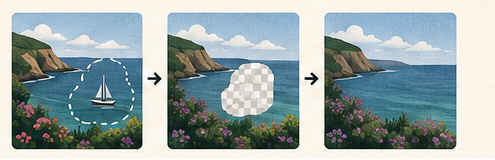
AI inpainting replaces a selected region while using the surrounding image and, in many tools, a text instruction as context. The mask defines where change is allowed. The model then generates pixels that attempt to continue nearby texture, lighting and structure.
This is different from restoring hidden truth. If an object covers part of a wall, the original wall pixels behind it are not available. The model creates a plausible reconstruction.
The mask controls the edit
A mask that stops inside the unwanted object can leave an outline. Extend the mask slightly beyond the object edge so the model can rebuild the transition. Include cast shadows and reflections when they belong to the object being removed.
At the same time, avoid masking a huge area unnecessarily. More generated area gives the model more freedom to change composition and identity.
Give the model useful context
Keep enough unmasked surroundings for texture, perspective and lighting clues. A tight crop around a masked object may remove the information needed to continue floorboards, bricks or a horizon.
Text instructions should describe the desired replacement, not a long story. Examples:
continue the plain white wall and soft window light;empty wooden table surface, matching the existing grain;remove the cable and continue the gray pavement.
When simple removal is the goal, an explicit instruction can reduce unwanted new objects.
Where inpainting works well
- small distractions on textured backgrounds;
- dust, cables and minor product-photo cleanup;
- extending simple walls, sky, water or foliage;
- replacing a contained decorative element;
- filling gaps after moving part of a composition.
Difficult cases
Text, faces, hands, repeated architecture and reflections expose small inconsistencies quickly. A model may create letters that look plausible but are incorrect, break a repeated tile pattern, or generate a reflection that does not match the new scene.
Large edits can also change semantic details outside the user expectation. Always compare the entire frame, not only the masked region.
A controlled workflow
- Duplicate the source or preserve an untouched original.
- Work at the largest practical resolution.
- Mask the object plus its shadow and a small edge margin.
- Write a short instruction describing the desired fill.
- Generate several candidates when possible.
- Inspect boundaries, perspective, repeated patterns and lighting.
- Refine with a smaller mask instead of regenerating the whole area.
- Save the mask or layered edit for later review.
Use responsibly
Inpainting is appropriate for creative work and disclosed cleanup. It should not be described as recovering information that was never visible. For documentary, legal, scientific or journalistic images, generated changes can alter meaning. Keep the original and disclose material edits where the context requires it.
Quality checklist
- The transition is invisible at normal size.
- Repeated lines and perspective remain consistent.
- Shadows and reflections match the replacement.
- No important text or identity changed accidentally.
- The full image has been reviewed for collateral changes.
- An untouched source remains available.
The strongest result often comes from several small, directed passes. A precise mask and restrained instruction give the model less room to create a visually impressive but contextually wrong answer.