
What Is EXIF Data?
Learn what photo metadata can contain, when it becomes a privacy risk, and how to create and verify a share-safe copy.
Updated September 5, 2026
On this page
A photo can contain more than pixels
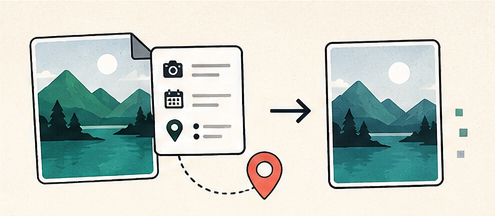
EXIF is a metadata format commonly used by cameras and phones. It can describe how an image was captured without changing what the image looks like. Applications use these fields to sort photos, display camera settings, rotate an image and organize a library.
Metadata is useful in a private workflow, but it deserves review before a file is published or sent to someone else.
What EXIF may reveal
The available fields depend on the device and application. A photo may include:
- capture date and time;
- camera or phone maker and model;
- exposure, aperture, focal length and ISO;
- orientation and software history;
- copyright or author fields;
- GPS latitude, longitude, altitude and direction;
- a small embedded preview image.
Not every photo contains all of these fields. Messaging apps and social platforms may remove some metadata, preserve it, or create new metadata during processing. Do not assume a service has cleaned a file for you.
Why location and time matter
Coordinates can disclose a home, school, workplace or travel pattern. A timestamp can connect an image with a specific event. Device details may not identify a person on their own, but they can become useful when combined with visible clues or other published information.
Removing metadata does not make an image anonymous. Street signs, reflections, uniforms, landmarks and document text remain visible in the pixels. Privacy review must cover both metadata and image content.
Preserve a source and make a share copy
Keep the original in a private archive if camera settings, capture time or location matter to your workflow. Create a separate exported copy for publishing. This avoids destroying information that may be useful later while reducing accidental disclosure.
A browser-side cleanup tool can decode the visible image and create a new file without copying the original metadata blocks. That approach is straightforward for common JPEG, PNG and WebP workflows. Confirm orientation and color after export because those may have depended on metadata.
How to inspect and remove EXIF safely
- Open the exact file you plan to share, not a similar copy.
- Inspect location, capture time, device and author fields.
- Decide whether any metadata is required by the recipient.
- Export a cleaned copy to a new filename.
- Reopen the exported copy in a metadata viewer.
- Verify that the image orientation, color and visible content are still correct.
For sensitive work, also inspect embedded thumbnails and XMP or IPTC metadata. EXIF is an important category, but it is not the only place an image can store descriptive information.
Metadata you may want to keep
A color profile can help reproduce colors consistently. Copyright and creator fields can be useful in a professional publishing pipeline. Capture settings help photographers learn from an image. Privacy cleanup should be intentional rather than an automatic deletion of everything in the only source file.
Before publishing
- Remove GPS unless location is intentionally part of the story.
- Check the pixels for addresses, screens, badges and reflections.
- Use a new filename that does not contain private information.
- Share the cleaned derivative, not the camera original.
- Verify the recipient received the cleaned file.
The CIPA Exif standard documents the format in detail. For everyday sharing, the practical rule is simpler: keep the original private and verify the exported copy.