
Image-to-Video AI Guide
Prepare a strong source frame, describe camera and subject motion clearly, and review identity, geometry and continuity before sharing a generated clip.
Updated September 5, 2026
On this page
The source frame is an anchor
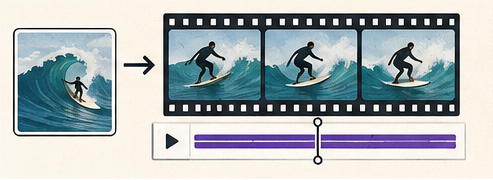
Image-to-video generation starts from a still image and predicts a sequence of new frames. The source strongly influences composition, color, identity and the first moment of the clip, but details may drift as motion continues.
Choose a frame that already works as an image. Generation is more controllable when the subject is clear, important objects are not cut off accidentally, and there is visual room for the requested movement.
Prepare the image
- Use a sharp source at the aspect ratio of the final platform.
- Remove accidental compression artifacts and unwanted text.
- Leave space in the direction the subject should move.
- Avoid tiny hands, faces or product details when identity is critical.
- Check that the background provides coherent depth cues.
Upscaling a poor source can make it larger without restoring trustworthy detail. Start from the best original available.
Separate camera motion from subject motion
A concise prompt can describe three things independently:
- Subject action: what changes inside the scene.
- Camera movement: pan, tilt, dolly, orbit or a locked camera.
- Scene behavior: wind, water, light, particles or background activity.
Example: The cyclist pedals slowly forward; the camera tracks alongside at matching speed; trees move gently in a light wind.
Avoid stacking many conflicting actions into a short clip. One clear subject action and one restrained camera instruction are easier to evaluate.
Start short and restrained
Longer clips create more opportunities for identity and geometry to drift. Begin with a short duration and low-to-moderate motion. Once the direction is stable, extend or create a follow-up shot.
Large camera moves reveal parts of the scene that never existed in the source. The model must invent hidden sides of objects and background areas, which increases inconsistency.
Review frame by frame
Watch the clip at normal speed, then scrub slowly. Check:
- faces, hands and product shape;
- readable text and logos;
- object count and disappearing parts;
- reflections, shadows and contact with the ground;
- background lines and horizon stability;
- jumps at the start or loop point.
A clip can feel convincing in motion while containing a visibly broken frame. Review before publishing, especially when the output represents a real person or product.
Build shots, not one endless generation
For a longer sequence, create several short shots with clear purposes: establishing view, detail, movement and ending. Edit them together in a normal video tool. This gives you control over timing and lets you discard a weak segment without regenerating everything.
Keep reference images, prompts, model versions and selected outputs organized by shot.
Export for the destination
Confirm aspect ratio, frame rate, duration, audio expectations and maximum file size for the platform. Video formats are usually more efficient and more widely playable than animated GIF for photographic motion.
Add captions when speech or meaningful audio is present, and avoid rapid nonessential motion for users who prefer reduced motion.
Rights and disclosure
Use source images you are permitted to transform. Get appropriate consent before animating an identifiable person. Do not present a generated event as documentary footage. Keep the original still and generation details when provenance matters.
A repeatable workflow
- Define the shot and destination.
- Prepare a correctly framed source.
- Describe one subject motion and one camera behavior.
- Generate a short low-motion test.
- Inspect continuity and identity frame by frame.
- Revise one variable at a time.
- Export, caption and disclose appropriately.
Treat image-to-video as shot design rather than a single magic prompt. Strong source composition and restrained motion usually matter more than adding adjectives.